

What happens when a room goes quiet just as you invite questions? Effective presentation skills training should prepare your team for that moment, not just help everyone polish their slides. Picture a colleague giving a clear, well-prepared talk, then losing their thread when someone challenges a key point. It’s a familiar pressure, and one you can practise handling.
You probably know the basics: keep your message clear, make eye contact and don’t cram every detail onto a slide. The harder part is putting those habits into practice when nerves kick in or the questions get awkward. In my 26 years in training, I’ve seen how much people can notice and change when they have space to try, reflect and try again.
Here, I’ll explore presentation do’s and don’ts, ways to handle challenging questions, and how realistic practice and constructive feedback can build confidence. Useful practice isn’t about rehearsing until every word is fixed. It’s about staying connected to your audience and adapting when the moment shifts. Start by noticing how your message lands.
Key Takeaways
- When a question feels challenging, pause, listen for the concern behind it and respond to that point rather than rushing to defend your presentation.
- Give your talk a clear beginning, a focused middle and an ending that leaves the audience with one memorable message.
- Use realistic practice and specific feedback to spot what’s working, adjust your approach and try again before the presentation matters.
- Build confidence through preparation and rehearsal, while learning how to stay present when nerves or unexpected questions arise.
Handling difficult questions and challenging audiences
A question such as “What happens if the figures change?” can shift the energy in a room. I help you prepare to respond calmly, keep the exchange useful and stay connected with your audience.
Communicating professionally
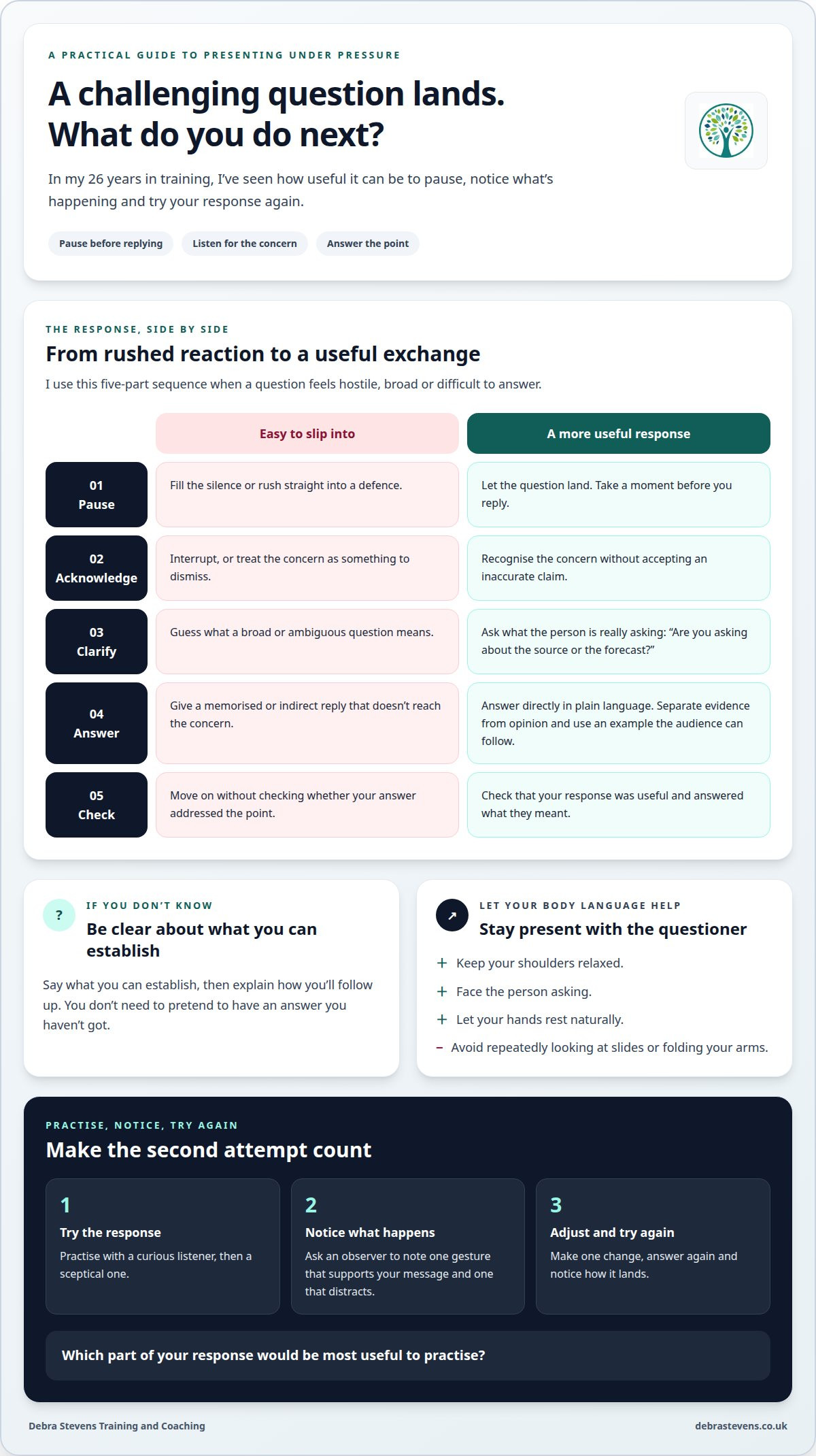
Listen for the concern behind a challenging question before answering. If someone asks, “Why should we trust these figures?”, acknowledge the concern, then explain how you reached your conclusion. Use plain language, distinguish evidence from opinion and avoid interrupting. These choices show respect and support your credibility. In practice, aim for direct answers that sound considered, not defensive or memorised.
Using non-verbal communication
Pay attention to how your body language supports your words. Keep your shoulders relaxed, face the questioner and let your hands rest naturally. Looking repeatedly at slides or folding your arms can make you seem distant. During practice, ask an observer to note one gesture that supports your message and one that distracts. Then try your answer again and notice how it lands.
When a question feels hostile, use a simple sequence: pause, acknowledge, clarify, answer, then check understanding. You might say, “I hear your concern. Are you asking about the source or the forecast?” Clarifying can refocus the discussion. If you don’t know the answer, say what you can establish and explain how you’ll follow up.
- Pause before replying instead of filling the silence.
- Acknowledge the concern without accepting an inaccurate claim.
- Clarify the question if it feels broad or ambiguous.
- Answer directly, using an example the audience can follow.
- Check that your response addressed the point.
Adapt your delivery as listeners respond. If people look puzzled, replace a technical explanation with a simple example. If they lean in, give the key point room to land. Ask, “Which part would be most useful to unpack?” This helps you engage your audience and hold attention without turning the presentation into a lecture. Practise with a curious listener, then a sceptical one. Notice how your pace and level of detail change.
What are the do’s and don’ts for presentation skills?
Start with one question: what do you want your audience to understand or do? Let your answer shape your opening, examples and final message. I’ve found that a clear purpose makes it easier to decide what to leave out, too.
Planning presentation structure
Organise your material around one clear message, then group supporting points in a logical order. For a project proposal, you might move from the issue to your recommendation, then the decision needed. Try saying the main message aloud before you build the slides. Does each point help your audience follow it?
Creating strong openings and endings
Open with a clear reason to listen, such as the decision your presentation will help the audience make. Close by returning to that purpose and naming a next action. You could practise your opening and ending aloud, then ask someone what they took away. Notice how it lands: can they identify the action?
Using storytelling and scripting
Use short, relevant stories to make abstract points easier to grasp. For example, describe a customer’s difficulty, explain what changed, then connect the example to your message. Rehearse your opening and transitions, but don’t script every sentence: memorised delivery can sound stiff. Try practising with a colleague and ask for one specific piece of feedback. Then have another go; a small adjustment can make your message clearer.
Structuring effective presentations
For a virtual presentation, keep the message clear and use visuals only when they help explain it. Before you present, check that each visual earns its place and that your main point is easy to follow. I’d also practise the conversation around your presentation: what might your audience ask, and how will you respond? You don’t need a perfect script. You need a clear message and a little room to listen.
Interactive practice and constructive feedback
People can learn more from one thoughtful second attempt than from a page of advice. Effective presentation skills training gives you room to practise, notice what happens and make a useful adjustment.
Practising presentations with guidance
I guide practice around situations you recognise, such as updating colleagues on a project. I listen for the message you want people to take away, then offer one specific observation to test. You might adapt the same update for senior leaders, where the decision may need to come first. In my experience, practising in varied settings and for different audiences helps you explore your choices.
Reviewing video-recorded presentations
If you record a presentation, review a short section at a time. Listen first without watching, then watch without sound. Does your spoken message match your expression and gestures? Note one strength and one adjustment, such as pausing after a key point. Treat the recording as a prompt for reflection, not a scorecard. Be curious, not brutal: look for something practical to try.
Applying feedback through practical exercises
Make feedback specific to behaviour and its effect. “You looked down during the recommendation” gives you something to work with; “be more confident” doesn’t. Try the section again with one adjustment and notice what changes. In an executive briefing, for example, you could state the decision first, then support it with evidence. That second attempt is where learning becomes active.
In effective presentation skills training, individual practice can be tailored to your role, career goals or nerves, while group exercises let you learn from different approaches. A workplace scenario with a professional actor can create realistic practice, supported by observation and immediate feedback. Try your message with a colleague, then a questioning stakeholder. What changes in your delivery?
Managing nerves and building confidence
Nerves can make a familiar message feel difficult to deliver. A practical plan gives you something steady to return to, whether you’re speaking to colleagues or presenting online.
Managing nerves and public-speaking fears
Good preparation gives your attention a clear place to go. A workshop citing the UK Government states that good preparation and rehearsal will reduce nerves by 75% and increase the likelihood of avoiding errors by 95%. Use rehearsal to practise the opening, transitions and likely questions, rather than memorising every word. If public speaking feels daunting, begin with a short update to a supportive group, then build towards a larger audience.
Building confidence in speaking style
Confidence doesn’t require a new personality. Choose a speaking style that sounds like you, then practise one deliberate adjustment, such as slowing down before your main point. Ask a colleague to notice whether your tone and body language support your message. This gives you specific feedback instead of a vague instruction to “be more confident”.
A clear message can steady your delivery. Write one sentence that captures what you want listeners to remember, then connect each example to that idea. For a virtual presentation, use a simple visual that reinforces the point instead of competing with it. Keep key notes near the camera, and pause after important information so remote listeners can follow.
Try this brief confidence routine before speaking:
- Say your opening aloud and check that it sounds natural.
- Practise the first transition, where nerves can interrupt your flow.
- Finish with the action you want the audience to take.
Notice how it lands: does your message sound clear, and does your pace leave room for the audience? If you’d like support preparing for a presentation, discuss presentation skills coaching.
Debra Stevens Training and Coaching: Presentation Skills Coaching
My Presentation Skills Coaching is a practical next step when you or your team want to make presentations clearer, more engaging and easier to deliver. I shape the work around your professional context, so practice connects with the conversations and audiences you actually face.
Rather than relying on theory alone, I use realistic workplace scenarios, observation and immediate feedback. Professional actors can support the practice by helping create those situations, giving you the chance to try again with a clear adjustment in mind. It’s a focused way to practise before the presentation counts.
If your team’s presentation challenges connect with wider communication or leadership needs, I can also draw on Communication & Impact Training or Leadership & Management Training where relevant. That way, the practice can reflect what your team needs to present and where people feel stuck.
Choose the next presentation to practise
Your next presentation doesn’t need to be a grand performance. Choose a real upcoming moment: a team update, a proposal or a difficult conversation. Decide what you want your audience to understand, feel or do. That gives your preparation a purpose and helps you judge whether the message is landing.
Effective presentation skills training can support more than the talk itself. It can help you think about how you communicate across your team, especially when you need to influence, explain a decision or invite people into a conversation. For that wider need, I also offer The Why Factor, Conscious Human Skills Workshops and Leadership & Management Training.
Start with one question: what would make your next presentation feel more like a conversation and less like a performance? I’d be glad to hear what you’re working on and explore a practical next step with you. Contact Debra Stevens Training and Coaching to discuss your presentation needs.
Frequently Asked Questions
How long is each training course?
There isn’t one fixed duration for every programme. Training can be shaped around your organisation’s aims and schedule, including bite sized 2-3 hour sessions. For example, a team preparing for client pitches might focus a session on presenting recommendations, whilst another group may need broader communication practice. The right structure depends on the skills to develop and the time your team can set aside.
What will I learn?
You’ll work on practical ways to make your message clear and connect with your audience. For example, you might practise explaining a proposal to a colleague who needs more context, then adapt it for a decision-maker who wants the headline first. The learning is experiential, helping you notice how your choices affect the conversation and what you could try differently next time.
Does it run online?
Training can be delivered virtually, including through Zoom, or in-house. An online session may suit a team joining from different workplaces; an in-house session can bring a group together in person. Either way, the focus stays practical. Your organisation’s needs, participants and training aims help shape the session.
What can you expect?
Expect active participation rather than a session spent listening to a long presentation. Activities can use realistic workplace situations, such as explaining a change to colleagues or responding to a customer concern. Professional actors can take part in role-play alongside facilitators, creating situations for practice. You’ll have the opportunity to explore communication choices in a setting connected to your work.
What topics should presentation skills training cover?
Choose topics that match the presentations your team actually gives. A project team might focus on explaining recommendations and making the next decision clear; a leadership group may need to communicate a strategic change with care. Useful areas include audience awareness, message clarity, delivery, visual support and responding to questions. Let your organisation’s purpose for presenting guide the emphasis.
How do online and in-person presentation skills courses compare?
Both formats can support practical learning, but they create different conditions for participation. Online sessions can bring together colleagues in separate locations, while in-person delivery lets people work together in the same room. Consider where participants will join from, which workplace situations they need to practise, and how the format can support discussion, observation and useful feedback.






One Comment